How Smart Import Uses AI to Auto-Fill Bank Bonuses From a URL
Smart Import lets you paste a bank bonus offer URL and have AI fill in the bank, amount, deadline, and requirements automatically, instead of copying them by hand. Here is exactly how it works under the hood: the extraction pipeline, the prompt engineering, the model, the cost, and the edge cases I had to design around.
If you've ever tracked a bank account bonus, you know the most tedious part: the data entry. You find a great offer on Doctor of Credit, then you squint at the fine print and retype it into your tracker: the bonus amount, how many direct deposits, the minimum per deposit, the deadline, the early-closure fee buried in the fine print. Every bonus, every time.
Smart Import is the BonusWave feature that does all that for you. You paste the offer URL, and a few seconds later the form is filled in. This post is a complete walkthrough of how it actually works.
What Smart Import does for you
From the user's side it's about as simple as a feature gets. In the "Add bonus" form there's a Smart Import box. You drop in a link to a bonus offer (a Doctor of Credit post, a bank's promo page, a NerdWallet writeup) and BonusWave reads the page, pulls out the bonus details, and pre-fills the form. You review, tweak anything it got wrong, and save.
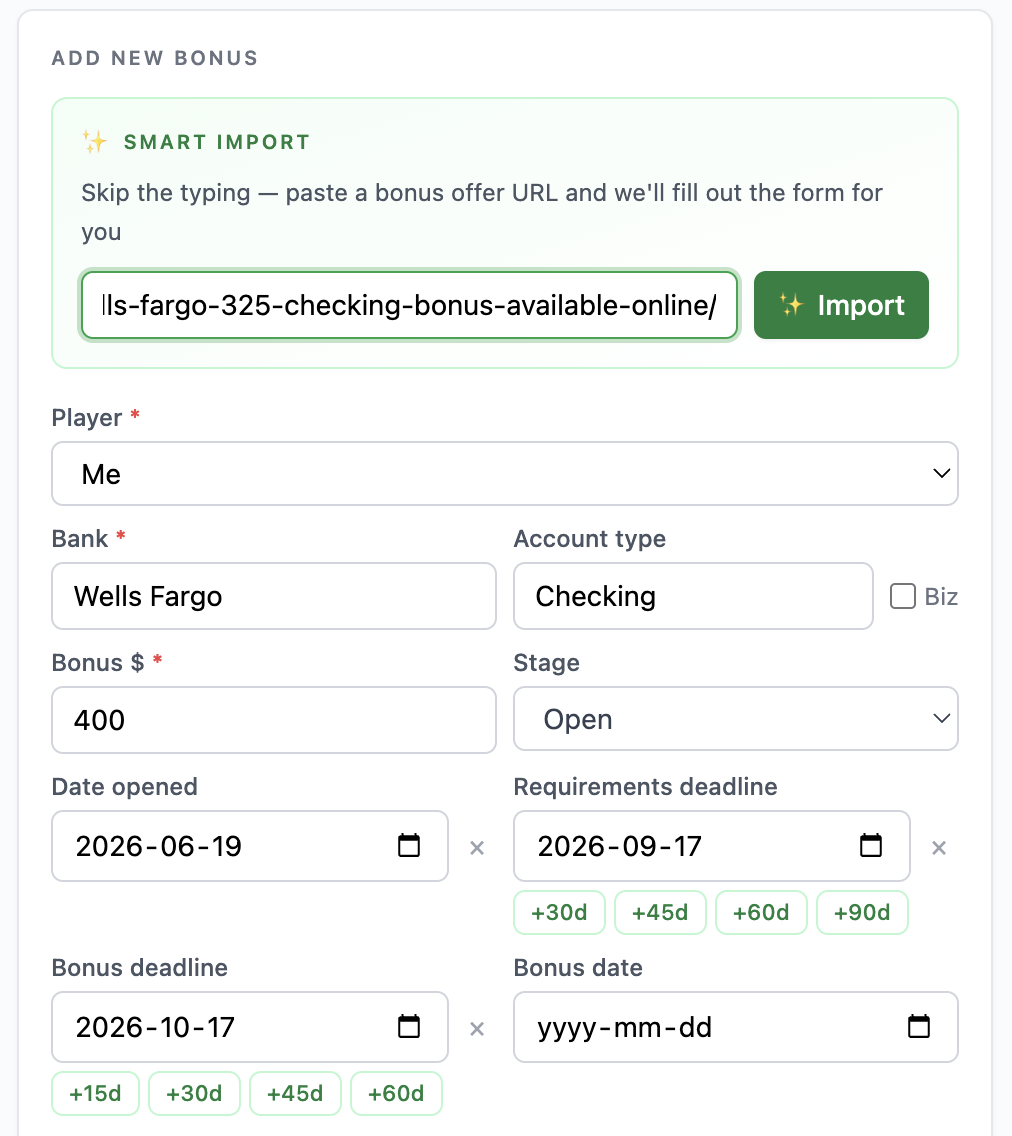
The whole point is to collapse "read the terms, interpret them, retype them" into "paste, glance, save." For someone running 10+ bonuses at a time (see how much you can actually earn doing this), that's a real chunk of friction gone.
Free accounts get 2 Smart Imports per month to try it; it's unlimited on premium. Now let's open it up.
The hard part: bonus terms are written for humans, not databases
Here's why this needs AI at all, and not just a scraper with some regex.
Bank bonus terms are gloriously inconsistent. The same requirement ("set up direct deposit") gets written a hundred different ways across a hundred different banks. The dollar amounts hide in sentences. The deadlines are relative ("within 90 days of account opening"). The early-closure fee that can quietly eat your bonus often isn't in the bonus terms at all - it's three clicks away in the deposit account agreement.
A churner reads a paragraph like this and just knows what it means:
New customers who open a Premier Checking account and receive
qualifying direct deposits totaling $5,000 or more within 90 days
will earn a $400 bonus, paid within 30 days after the qualification
period ends. A $50 early closure fee applies if the account is
closed within 180 days of opening.
The job of Smart Import is to turn that prose into structured fields the app can actually track:
{
  "bank": "(from the page)",
  "accountType": "Checking",
  "bonusAmount": 400,
  "ddTotalRequired": 5000,
  "ddMinPerDeposit": null,
  "ddCountRequired": null,
  "cardTxnRequired": null,
  "minBalance": null,
  "bonusDaysFromOpen": 90,
  "bonusDaysAfterRequirements": 30,
  "closeFeeWindowDays": 180,
  "requirements": "Direct deposits totaling $5,000+ within 90 days"
}
Going from the first block to the second is exactly the kind of fuzzy, context-dependent reading that large language models are genuinely good at and rule-based parsers are genuinely bad at. That's the whole reason there's a model in the loop.
Under the hood: the pipeline
When you paste a URL and hit import, here's the full path the request takes:
  Paste URL
     │
     ▼
  Validate URL  ──►  reject if not a valid https:// link
     │
     ▼
  Fetch the page (10s timeout)
     │
     ▼
  Strip HTML  ──►  remove <script>/<style>, drop all tags,
     │             collapse whitespace, cap at 8,000 chars
     ▼
  Send text + extraction prompt to Claude Haiku 4.5
     │
     ▼
  Pull the JSON object out of the response
     │
     ▼
  Pre-fill the form  ──►  you review & save
The interesting decisions are inside each box. Let's go through them.
Step 1: Fetch the page and strip it down
The first job is getting clean text out of a messy webpage. I don't send raw HTML to the model, that's mostly navigation, scripts, styling, and cookie banners, and every one of those tokens costs money and dilutes the signal.
So the server fetches the URL and runs a quick cleanup pass:
const res = await fetch(url, { signal: AbortSignal.timeout(10000) });
const html = await res.text();

const pageText = html
  .replace(/<script[^>]*>[\s\S]*?<\/script>/gi, "") // drop scripts
  .replace(/<style[^>]*>[\s\S]*?<\/style>/gi, "")   // drop styles
  .replace(/<[^>]+>/g, " ")                          // drop all tags
  .replace(/\s+/g, " ")                              // collapse whitespace
  .trim()
  .slice(0, 8000);                                   // hard cap
A few deliberate choices here:
- HTTPS only, with a 10-second timeout. It's a server-side
fetchagainst a user-supplied URL, so it needs guardrails. No plain HTTP, no hanging forever on a slow page. - Tags get replaced with a space, not nothing.
<td>$400</td><td>Checking</td>should become$400 Checking, not$400Checking. Small thing, but it prevents the model from reading mashed-together garbage. - The 8,000-character cap is the big tradeoff. It keeps the cost and latency low and bounds the worst case, but it's also the source of a whole class of edge cases (more on that below). Bonus details are usually near the top of a page, so this works far more often than it fails, but when the early-closure fee lives at the very bottom of a long terms page, the cap can clip it.
This step is plain string manipulation, no AI yet. It's the unglamorous 80% that makes the AI part work.
Step 2: The prompt
This is the heart of it. The cleaned text gets appended to a single extraction prompt and sent to the model. Here's the real prompt, lightly trimmed:
Extract bank bonus details from this page. Return ONLY a JSON
object with these fields (use null for any field not found or
not applicable):

- bank (string): bank or credit union name
- accountType (string): e.g. "Checking", "Savings", "Money Market"
- bonusAmount (number): bonus amount in dollars (no $ sign)
- requirements (string): brief summary of all requirements
- ddCountRequired (number): number of direct deposits required
- ddTotalRequired (number): total direct deposit dollar amount
- ddMinPerDeposit (number): minimum amount per individual deposit
- cardTxnRequired (number): number of debit card transactions
- minBalance (number): minimum balance to maintain
- minBalanceDays (number): days to maintain minimum balance
- isBusiness (boolean): whether this is a business account
- bonusDaysFromOpen (number): days from opening to meet requirements
- bonusDaysAfterRequirements (number): days after requirements are
  met until the bonus posts (e.g. "paid within 30 days after the
  deposit period ends" → 30)
- closeFeeWindowDays (number): days from opening during which an
  early closure fee applies (e.g. "$50 fee if closed within 90 days
  of opening" → 90). Look at the deposit account agreement / fee
  schedule, not just the bonus terms.
- bonusClawbackDays (number): days after the bonus posts during
  which the bank may reverse it if the account is closed

Page content:
<content from Step 1>
There's more prompt engineering packed in here than it looks. The decisions that matter:
"Use null for any field not found." This is the single most important instruction. Without it, the model wants to be helpful and guess - it'll invent a minimum balance because most accounts have one, or assume two direct deposits because that's common. For a tool people make financial decisions with, a confident wrong number is far worse than an honest blank. null means "I didn't see this," and the form just leaves that field empty for you to fill.
Inline examples for the ambiguous fields. Notice the → examples on the date fields. "Paid within 30 days after the deposit period ends" and "$50 fee if closed within 90 days of opening" are exactly the phrasings that trip up extraction, because the number and the thing it's counting are several words apart. A tiny inline example (this is just lightweight few-shot prompting) does more to fix that than another paragraph of instructions.
Telling the model where to look. The closeFeeWindowDays field explicitly says to check the deposit account agreement and fee schedule, "not just the bonus terms." This encodes churner domain knowledge directly into the prompt - the early-closure fee is one of the most common ways people lose money churning, and it's almost never in the headline offer.
Typed fields, not free text. Asking for bonusAmount as a number with no $ sign, and breaking direct deposits into count / total / per-deposit, means the output drops straight into the app's existing fields. The schema here mirrors the structured bonus fields the rest of BonusWave already uses - Smart Import isn't a separate data path, it's just a faster way to fill the same form.
Step 3: Send it to Claude Haiku 4.5 (and what it costs)
The model is Claude Haiku 4.5 - Anthropic's small, fast, cheap model. I want to be fully transparent about this because the model choice is the engineering decision here.
Smart Import is a high-volume, low-difficulty task. Extracting "$400" and "90 days" from a paragraph isn't a reasoning problem that needs a frontier model - it's a reading-comprehension problem that a small model nails. The tradeoffs all point the same way:
- Cost. Haiku 4.5 is $1.00 per million input tokens and $5.00 per million output. A typical import sends roughly 2,500 tokens of page text plus the prompt, and gets back a couple hundred tokens of JSON. That works out to well under half a cent per extraction - around $0.004. At that price I can give free users a couple of imports a month and not think about it.
- Speed. A small model returns in a second or two, which keeps "paste → filled form" feeling instant. A bigger model would add latency for accuracy I don't need.
- Good enough is the right bar. You review every import before saving. The model doesn't have to be perfect; it has to save you typing, and a tiny correction now and then is still a massive net win over filling 12 fields from scratch.
If I were doing open-ended reasoning over the terms - "is this bonus worth it given my situation?" - I'd reach for a larger model. For "read this and fill these boxes," Haiku is exactly the right tool.
Step 4: Pull the JSON out of the response (defensively)
I ask for "ONLY a JSON object," but you don't build on a model always returning only that. Sometimes there's a stray "Here's the extracted data:" in front, or a markdown code fence around it. So the parse step is defensive: it finds the first {...} block in the response and parses that, rather than trusting the whole string to be valid JSON.
const text = message.content[0].type === "text" ? message.content[0].text : "";
const jsonMatch = text.match(/\{[\s\S]*\}/);   // grab the JSON object
if (!jsonMatch) {
  return { ok: false, error: "Could not parse bonus details", status: 422 };
}
const parsed = JSON.parse(jsonMatch[0]);
If there's no JSON-looking blob at all, it fails cleanly with a readable error instead of throwing. It's a small thing, but "the model added a sentence of preamble" should never crash a feature.
The edge cases (the messy reality)
This is the part that doesn't show up in a demo but is most of the actual work. A clean happy-path extraction is easy; making it robust against the real web is where the time goes.
- JavaScript-heavy pages. Smart Import reads the HTML that comes back from a plain
fetch. If a site renders its content client-side with JavaScript, the raw HTML can be nearly empty - there's nothing for the model to read. This is the most common reason an import comes back thin. - The 8,000-character clip. On a long terms-and-conditions page, the early-closure fee or clawback window can fall past the cap and get silently dropped. The model can only extract what it's shown.
- Multiple bonuses on one page. Doctor of Credit roundup posts list dozens of offers. Point Smart Import at a roundup and it has no way to know which one you meant - single-offer pages work far better. The fix here is user behavior (paste the specific offer), but it's a real limitation worth naming.
- Hallucinated numbers. Covered above, but it's the failure mode I care about most. The
null-by-default instruction is the guardrail, and it's why the prompt repeats "not found or not applicable" right at the top. - Paywalls, bot blocks, and dead links. A 403, a Cloudflare challenge, or a timeout all need to fail gracefully with a message that tells you to just fill the form manually - not a spinner that never resolves.
None of these are fully "solved." They're managed - with timeouts, caps, clear error messages, and a UI that always lets you fall back to typing. Shipping a feature like this is mostly about being honest with yourself about how it fails.
One detail I'm quietly proud of: the quota gate
Free users get 2 imports a month, so there's a counter. The subtle bit is when it ticks.
An import only counts against your quota if it actually pulled useful data - at minimum a bank name, account type, bonus amount, or requirements summary. If you paste a JavaScript-heavy page and the extraction comes back empty, that one's on the house; it doesn't burn one of your two.
export function hasUsefulData(d: ExtractedBonus): boolean {
  return Boolean(
    d.bank || d.accountType || d.bonusAmount != null || d.requirements
  );
}
It's a few lines of code, but it's the difference between "this feature respects me" and "this feature wasted one of my two tries on a page it couldn't even read." The small fairness details are what make a tool feel good to use.
Try it
Smart Import lives in the "Add bonus" form in BonusWave - free accounts get 2 a month, premium is unlimited. If you're still deciding how to track all this, I wrote up the different ways to track bank bonuses and the free tool I built to do it.
If you build things and want to talk shop about the LLM plumbing - or you're a churner with a page that breaks the importer (I'd genuinely love the test case) - reach me at hello@bonuswave.app.